Home / Education & Math / Percentage Calculator 02 · A little clarity EXAMPLE RESULT
Enter your measurements and calculate.
Copy Link Copy Results Share Result
Calculated in your browser. Shared links include your entered values; only share information you intend to make public.
Share your result × Make a result card for your feed, Story or group chat.
Standard calculator links include the current inputs. Image formatSquare · 1080 × 1080 Story · 1080 × 1920 Inputs are included by default; uncheck to hide them. Names are never included. This setting applies to images and new preview links. Standard calculator links still contain your calculation inputs.
Share image… Download image
Choose an installed app in your device’s sharing menu. For web platforms, download the image and attach it to your post. Nothing is published automatically. Give your link a little personality Create a link with a beautiful preview of this result.
Anyone with the link can view it for 14 days. Creating a link sends calculation inputs to our server to verify the result. Inputs are saved and shown only if “Include calculation inputs” is checked above. Names are never sent. You can delete the link here; platforms may keep cached copies. Create preview link
Your active preview links Deletion controls are saved in this browser. Links expire after 14 days.
Share a link These buttons share a link. Create a preview link above to give it a result image. Each platform decides how the preview appears; this does not attach a photo to a post. This result is too long for some share links. Copy the result or reduce the number of inputs.
More apps… Copy result link Copy result text
Some platforms include only the link. Copy result text to add your numbers to the post. Links may open in a new tab.
How to use Choose the question that matches your problem, then enter X and Y in the order shown. For increase and decrease, X is the original value and Y is the new value. Calculate to see the result and substituted arithmetic.
For related tasks, try the Fraction Calculator .
Formula & how it works X% of Y = X × Y/100. Percent change = (new − original)/original × 100. Percent difference = |X − Y| ÷ ((X + Y)/2) × 100.
Worked examples Example 1 20% of 150 = 20 ÷ 100 × 150 = 30.
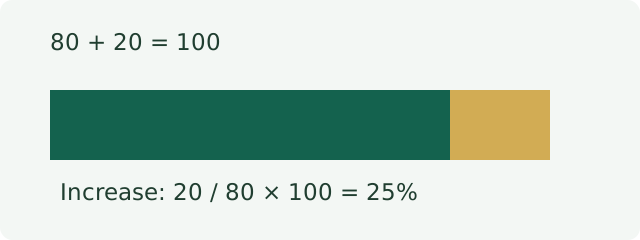
Example 2 An increase from 80 to 100 is (100 − 80) ÷ 80 × 100 = 25%. The percentage difference is 20 ÷ 90 × 100 = 22.2222%.
Assumptions & practical notes Change modes require a positive original value. Difference uses nonnegative values and their average as the denominator.
Percentage points are an absolute subtraction: moving from 20% to 25% is 5 percentage points, but a 25% relative increase.
See our calculation methodology for unit definitions and testing practices.
Frequently asked questions Why does reversing a change give a different percentage? The denominator changes. A rise from 80 to 100 is 25%; returning from 100 to 80 is a 20% decrease.
Can the base be zero? No for division-based percentages. A percent of zero is zero, but a change from zero has no finite percentage.
Related calculators Fraction Calculator Add, subtract, multiply, divide, and convert fractions, mixed numbers, and decimals.
Open calculator → Grade Calculator Calculate your class grade from points or weighted assignments, or find a test grade from questions missed.
Open calculator → Average Calculator Find the arithmetic mean, sum, count, minimum, and maximum of a number list.
Open calculator → Percent Error Calculator Compare a measured value with a reference value and find absolute percentage error, signed difference and direction.
Open calculator → Take it with you Use Copy Link to save these inputs or share a result with someone else.
Embed this calculator Preview a widget and choose its size .
Paste this HTML into your website. The widget calculates locally and contains no third-party scripts.
Embed code Copy embed code Report an error
Updated 2026-09-22  CalcCommons